Open Settings → Organization → Mail → Delivery. The tab shows a count when something needs you, for example a bounced address.
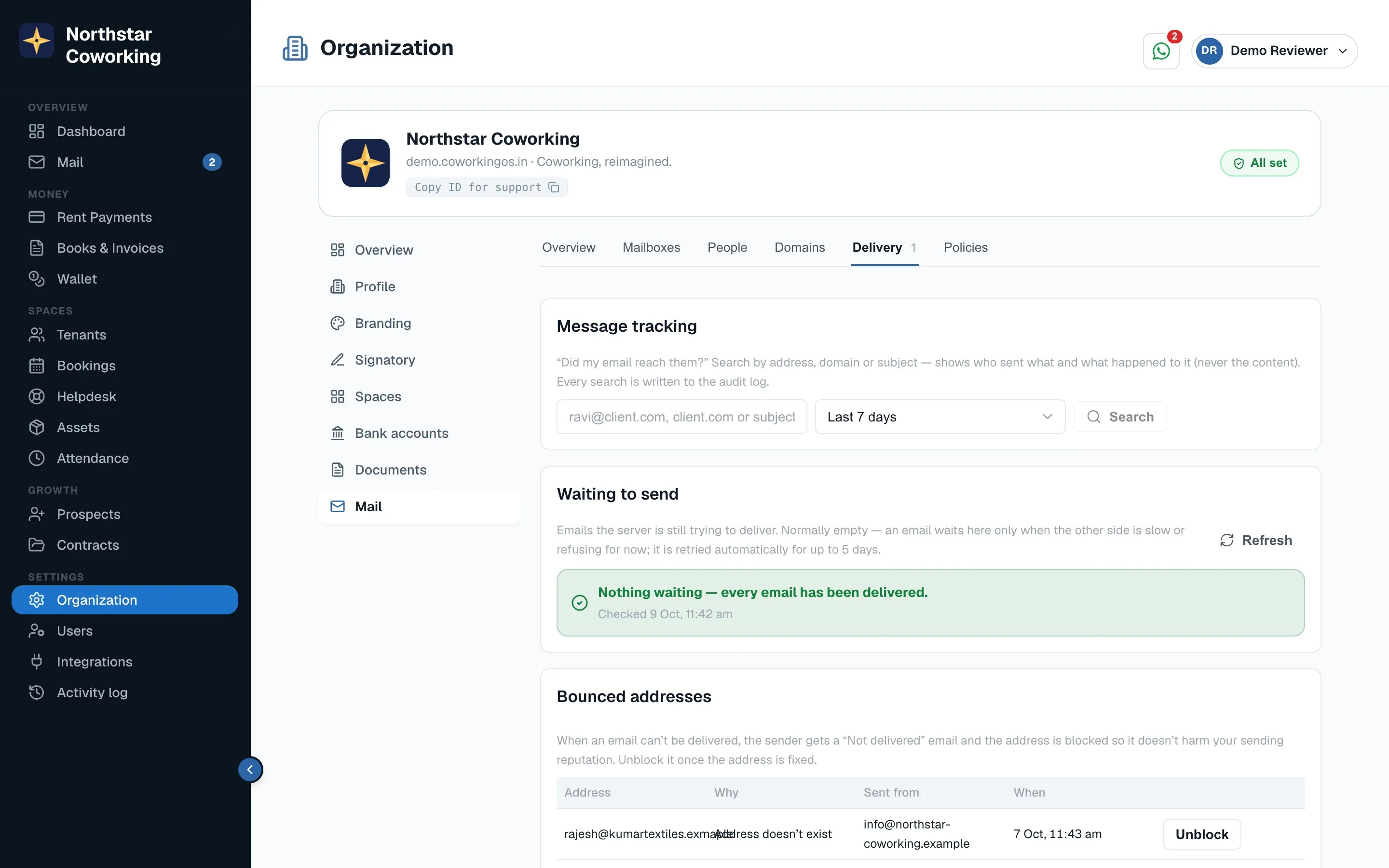
- Message tracking: search by sender, recipient, subject or date and see the email's journey: received or sent, its spam score and why, which folder it landed in, handed to the mail service, bounced, or held.
- Waiting to send: normally the green all-clear. Emails a receiving server is temporarily refusing wait here with Retry and Cancel.
- Bounced addresses: when an address bounces, the sender gets a plain-words 'Not delivered' note in their inbox and a red badge on the email in Sent; the address is listed here. Fix the mailbox on the other side, then Unblock. Typing a blocked address in the composer warns you before sending.
- Spam held: suspicious mail waits here. Preview it safely, then Release or Delete. A daily digest tells you what was held.
- Spam lists: senders, domains and addresses to always allow or always block, for the whole organisation. Tenants and leads can be trusted automatically.
An outgoing guard pauses a mailbox that suddenly sends unusual volumes and alerts you, so one hacked login can't damage everyone's email reputation.
Related guides
Still stuck? WhatsApp us or write to info@coworkingos.in. Tell us the tenant or screen and we'll sort it with you.