The Website kit is built in; there's no Tidio, Zoho SalesIQ or Mailchimp to pay for. It's off by default, and only a Super Admin can switch it on, in Organization → Website kit. While it's off, the script does nothing.
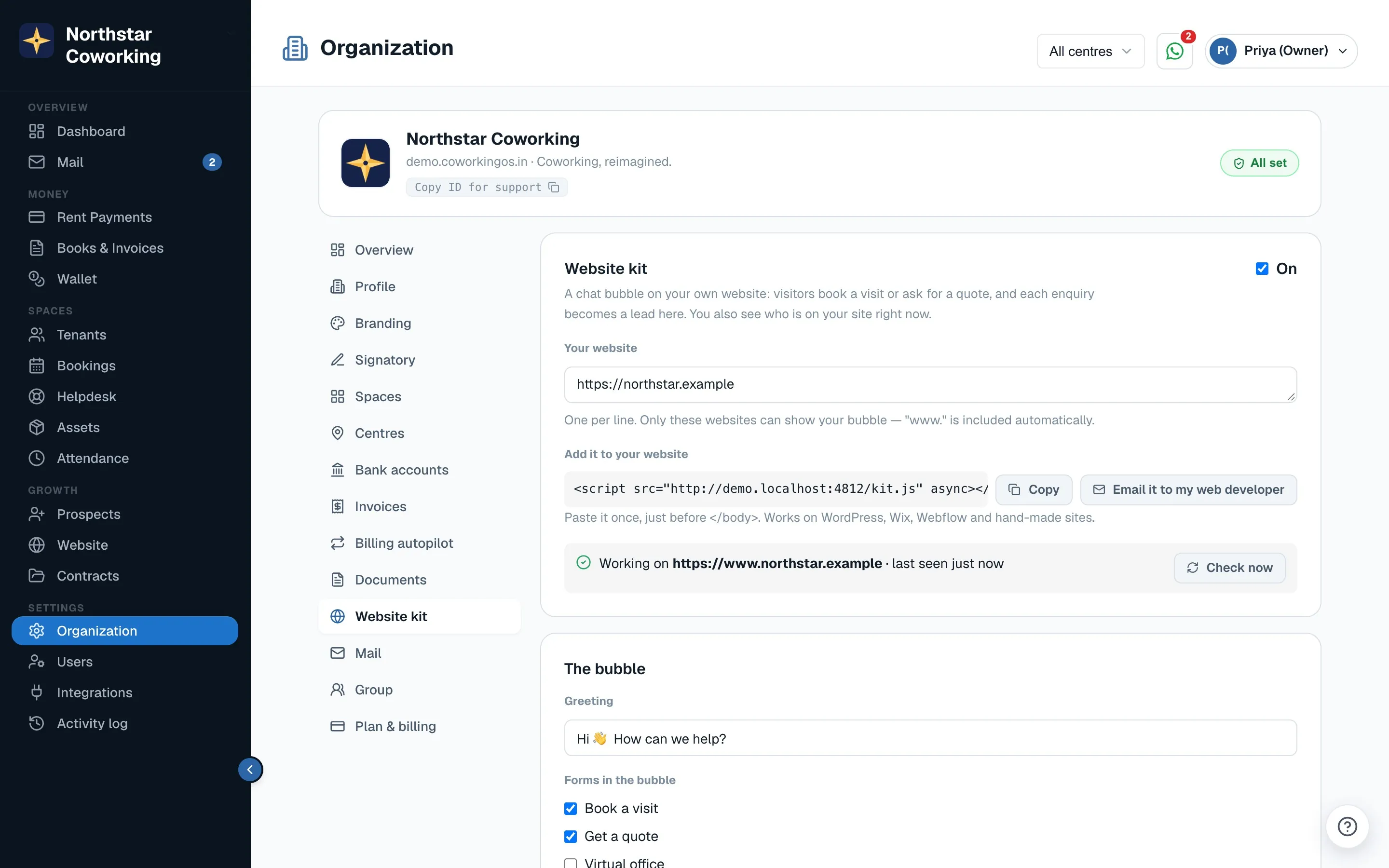
- Open Settings → Organization → Website kit, tick On, and enter your site under Your website (one per line; only these sites can show the bubble).
- Under Add it to your website, click Copy and paste the line once, just before
</body>. It works on WordPress, Wix, Webflow and hand-made sites. Or click Email it to my web developer. - Click Check now. It turns green once the kit has loaded on your site (a site added through Google Tag Manager or a plugin turns green by itself once someone opens it).
- Set The bubble: the greeting, which forms it offers (Book a visit, Get a quote, Virtual office, Meeting room), the WhatsApp button and Call button with your number, and the colour (Your brand colour takes it from Branding).
- Set Hours and alerts: when you answer (India time) and what the bubble says outside those hours.
- Click Save changes.
What visitors see
- A chat bubble bottom-right (at the bottom on phones) in your colour and logo. It never covers your site's own buttons.
- In the panel: a greeting, then What's free & prices, Book a visit, Chat with us and WhatsApp us, plus a call button. Optional: Already a member? Get help (opens the tenant portal's Help, so members' requests go to the Helpdesk, not Sales) and Get updates.
- Forms: Book a visit, Get a quote, Virtual office and Meeting room enquiry. Use them in the bubble, as a full page, or embedded with
<div data-cos-form="visit"></div>(alsoquote,virtual-office,meetingandnewsfor the newsletter box).
Every form becomes a lead
- A submission creates or updates a Prospect, matched by phone or email so there are no duplicates, with the source, page, campaign and referrer.
- Staff are alerted by WhatsApp, email and push; the visitor gets a confirmation; the Activity log records it.
- Spam is kept out by a hidden field, a minimum fill time, rate limits and blocked words. Visitors never see a captcha.
Visitors now, lead score and Signals
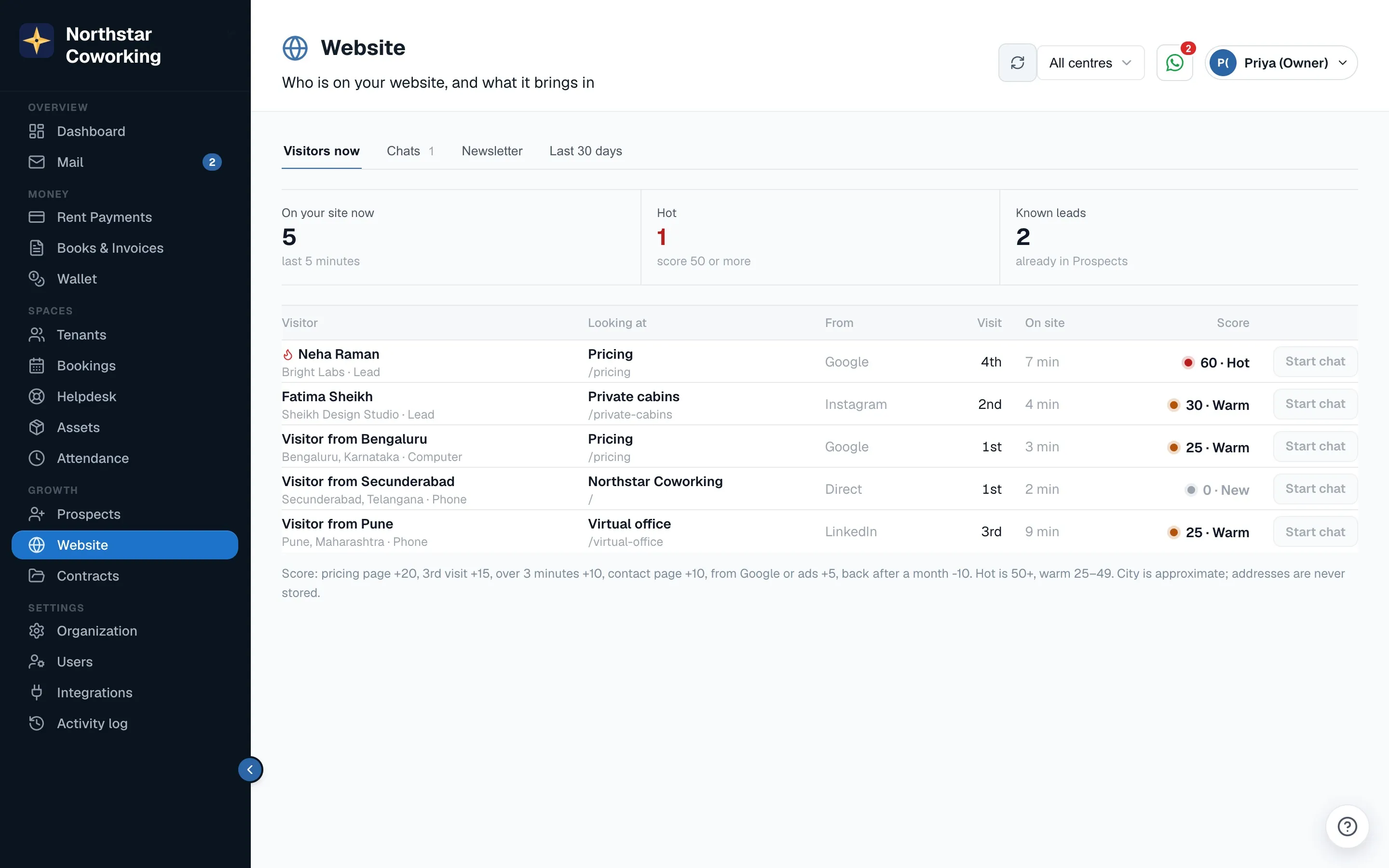
Website in the left menu shows who is on your site right now (refreshed every 15 seconds), hot leads first. Each visitor has a Score: pricing page +20, 'What's free' used +25, 3rd or later visit +15, over 3 minutes on the site +10, contact page +10, from Google or ads +5, 30 days away −10. Hot is 50 or more, warm 25–49. Prospects gets a Score column and a Hot filter.
Signals: switch on Tell me when a lead comes back and the lead's owner (or all sales staff, if nobody owns it) gets a push alert when someone already in Prospects is on the site, at most once per visit, plus one 🔥 alert if their score passes 50.
Related guides
Still stuck? WhatsApp us or write to info@coworkingos.in. Tell us the tenant or screen and we'll sort it with you.