When a bank account has a UPI ID, every invoice that still has something due carries a Pay by UPI QR: on the PDF, in the invoice email and in the member app. It is separate from the Pay Now link; both can show.
What the member does
- In the member app, open Pay and tap the unpaid invoice. Scan the QR, copy the UPI ID or tap Open UPI app.
- After paying, tap I've paid and enter the 12-digit UTR, the amount (filled in with what is due) and the date. A screenshot is optional.
- The app says we're checking with the bank. When you confirm, the member gets the receipt and a push; if not, they see the reason and can try again.
Cabin members and desk / virtual-office members both have I've paid. A claim can't be more than that invoice's balance, and a UTR can be used only once in your space.
What you do: Payments to confirm
Claims appear in Rent Payments → Payments to confirm (the pill at the top), on the Dashboard under Needs you, and on the phone in Money → To confirm. Super Admins and Staff decide; Viewer admins see the list without buttons.
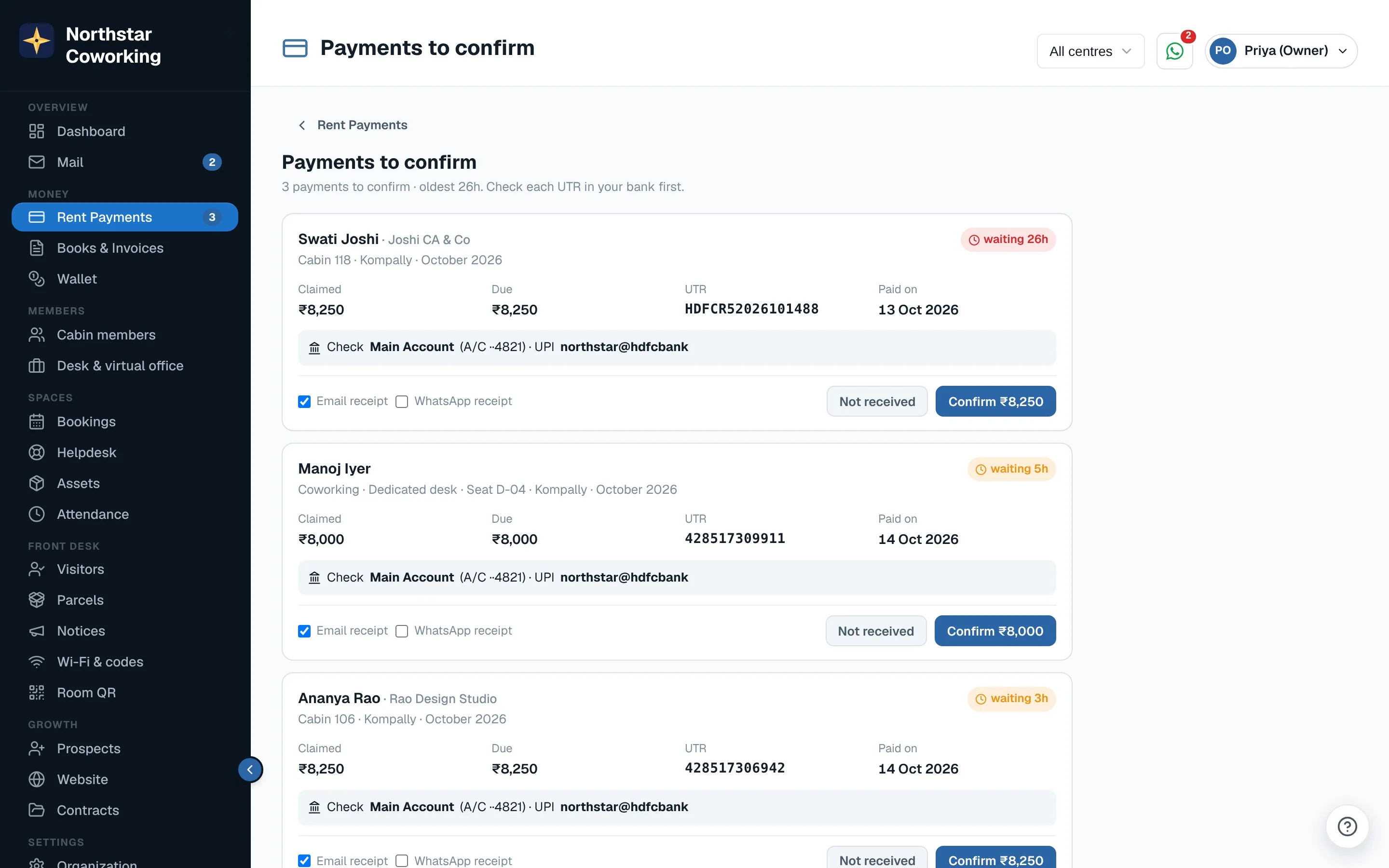
- Check your bank account for the UTR and amount shown on the card.
- Press Confirm. You have 5 seconds to undo; then the payment is recorded with the UTR as the reference and the receipt goes out by email (WhatsApp if you tick it).
- Not in the bank? Press Not received, pick the reason (not in our bank, wrong amount, wrong UTR, other) and add a note. The member sees it and can try again.
Nobody forgets
- After 2 working hours (9 am to 8 pm), Super Admins and Staff get a reminder push.
- After 24 hours, Super Admins get a push and an email.
- The morning overdue digest lists how many payments wait to be confirmed, and automatic rent reminders skip a month with a claim waiting.
Add the UPI ID in Organization → Bank accounts. Push for Payments to confirm can be switched off in Notifications settings.
Related guides
Record a payment (cash, UPI, cheque, transfer) →Bank accounts: UPI ID, legal name and PAN →Pay your rent and download receipts →
Still stuck? WhatsApp us or write to info@coworkingos.in. Tell us the member or screen and we'll sort it with you.