The Board is one place where members of your space ask for help, offer their services, share jobs and leads, sell a spare chair or just say hello. The Directory lets members who want to be found list themselves. Both live under Community on the desktop (More → Community on the phone). Super Admins and Staff moderate; Admin viewers read; a guest viewer sees neither, because they hold member names and writing.
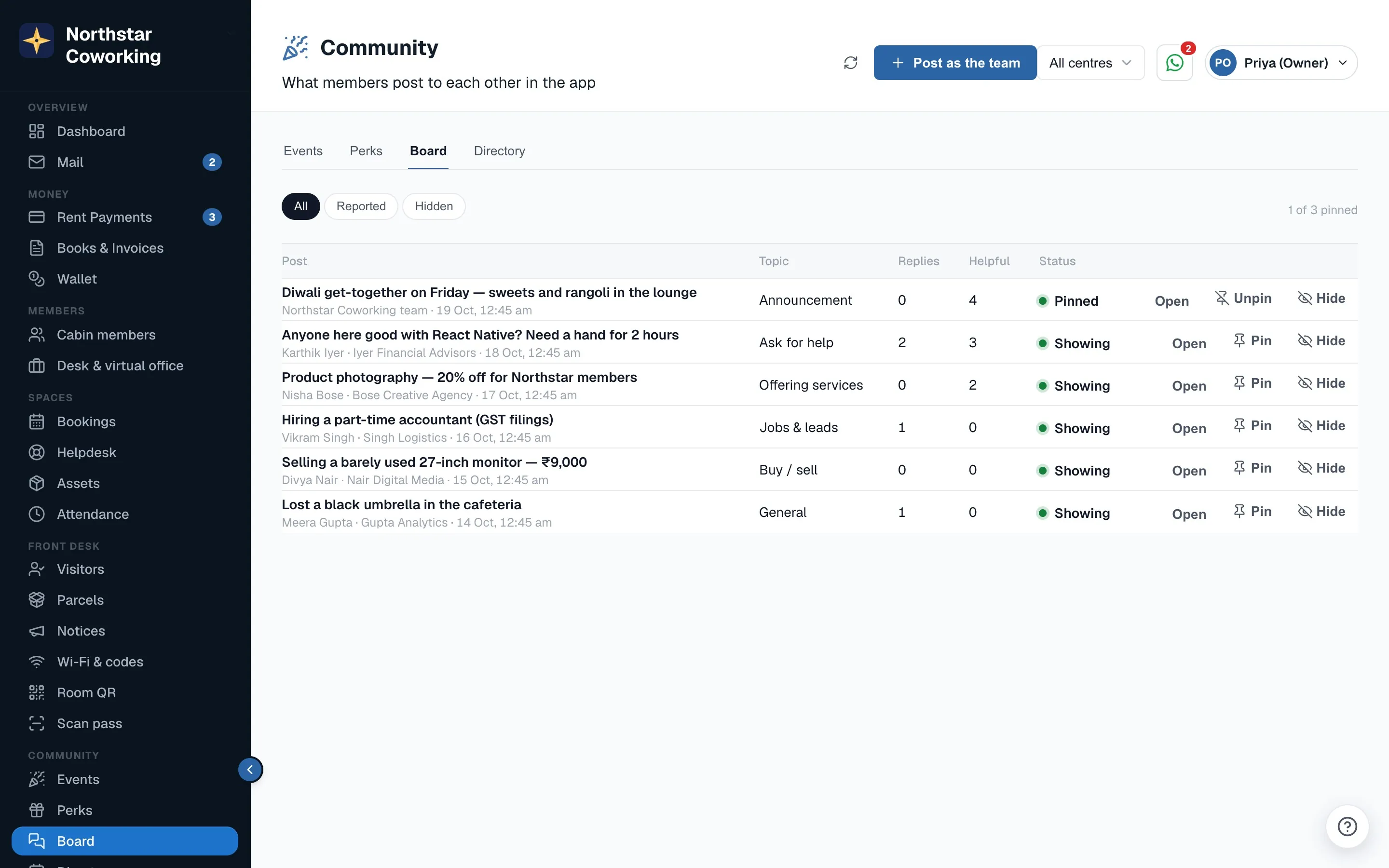
The board
What members can do
- Post to the whole space, or tick just my centre. Topics: Ask for help, Offering services, Jobs & leads, Buy / sell and General.
- A post has a title (up to 120 characters) and a plain-text body (up to 2,000). Web links become tappable; at most 3 links a post. No photos, no formatting.
- Reply under a post (up to 1,000 characters). Replies read oldest to newest.
- Mark a post or reply Helpful, once per person. The count shows on it.
- Edit or delete their own post or reply within 24 hours. A deleted post that already has replies stays as a deleted placeholder so the thread still makes sense; one without replies disappears.
- Report a post or reply as spam, offensive, a scam or other. When 3 different people report the same thing it is hidden automatically until staff look at it.
- Follow or mute a post. The author and everyone who replies follow it by default and get a push on new replies; mute stops that.
- Find things with the topic chips and search. Pinned posts come first, then newest.
A post shows the author's name and company. Tapping the name opens their directory card only if they have listed themselves in the directory and you have not hidden them. Nothing else about a member is ever shown. If a member's sign-in is later deleted, their posts stay but the name becomes Former member.
What staff can do
- Post as the space. Your post shows as {space} team, not under your own name. Staff also have a topic members do not: Announcement.
- Pin a post so it stays at the top, up to 3 at a time. Pin the Wi-Fi password change, the Diwali holiday list, the cricket screening. Unpin when it is stale.
- Hide any post or reply. A reason is required and it is kept with the post. Unhide if you change your mind. Hidden items are visible to staff with a marker; members never see them.
- Review reports. Each report shows who reported and why. Hide the post, or Dismiss the reports if it is fine. You get a push whenever something is reported, so you do not have to keep checking.
Staff see every post and reply, including hidden ones. Staff cannot reply inside a thread in this version; if you want to answer a question, post a new one as the space team, or contact the member directly through a message.
Limits that keep it civil
- 5 posts and 30 replies per person per 24 hours, deleted ones included. Enough for a busy member, too few for a spammer.
- 3 links a post; http and https only.
- Plain text only. Pasted HTML is shown as text, never rendered.
- A post's topic and centre cannot be changed after it is posted. The member deletes it and posts again.
What members see on Home
Members get a small New on the board card on their Home screen with the latest 2 posts from the last 7 days, so the board stays visible without a separate tab. Pushes go to the post author and earlier repliers when someone replies, and nowhere else: there is no weekly digest in this version.
The member directory
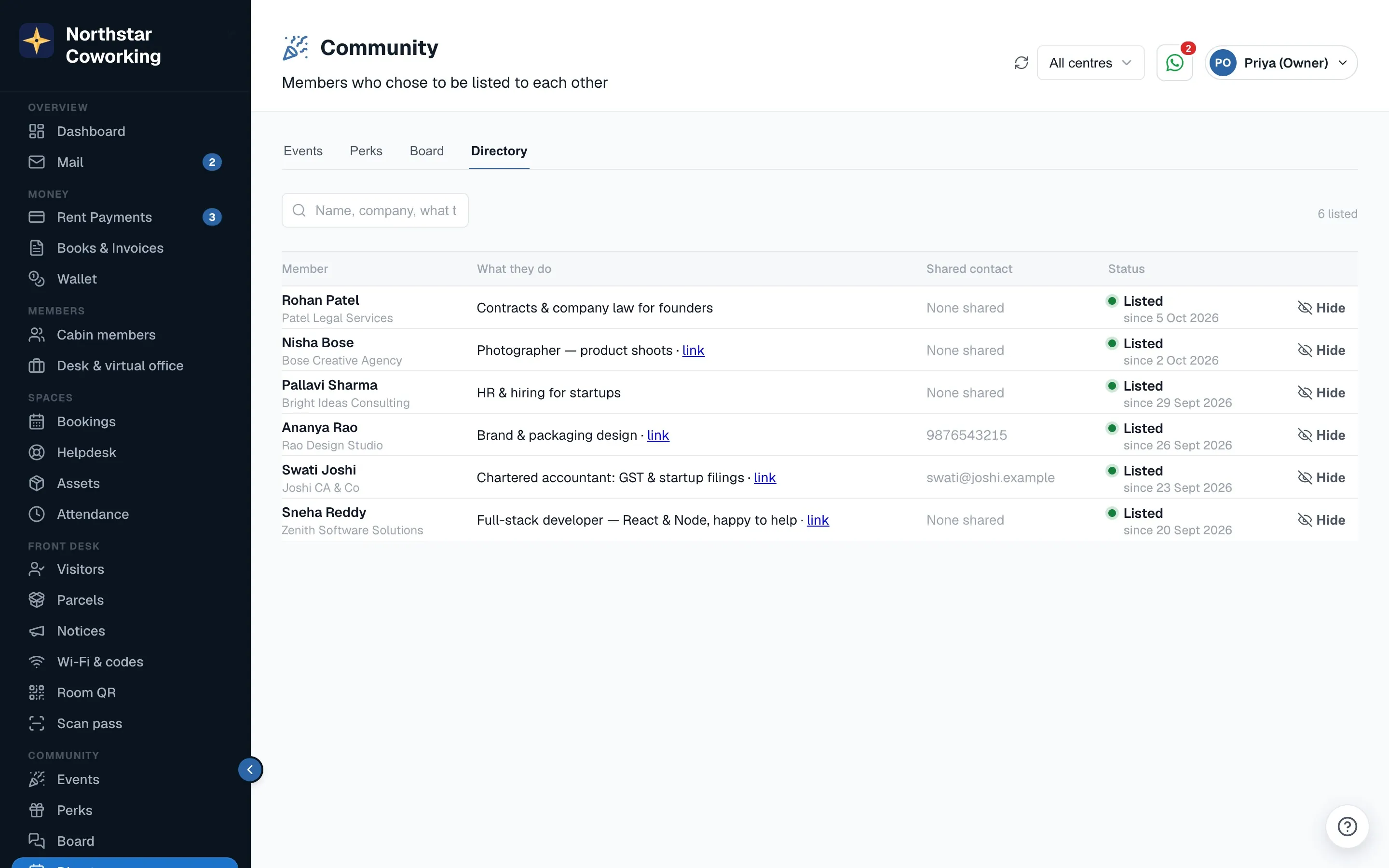
The directory is off for everyone by default. A member who wants to be found opens Account in their app and turns on Show me in the member directory. Nobody is listed because they joined; nobody is listed because staff thought they should be. Staff can never turn someone on. This is how the Digital Personal Data Protection rules expect it, and it is also what members expect.
What a listed member shows
- Name and company, always.
- A one-line what I do, if they write one: Chartered accountant, GST and audits.
- A website or LinkedIn link, optional.
- Phone and email, only if each is ticked separately. A member can share their email and keep their phone private.
Members see listed people of the same space only, newest first, with a search box. There are no direct messages inside the app; a member who wants to talk uses the phone or email the other person chose to share.
What staff can do
- See who is listed and what each person chose to show.
- Hide a profile that is misusing the directory, for example a recruiter who joined for a week to harvest contacts. The member is not told; their switch still looks on, but nobody sees them. Unhide when sorted.
- That is all. Staff cannot list, edit or unlist a member. If someone asks you to take them off, show them the switch in Account; turning it off removes them at once.
Good to know
- Everything on the board and in the directory belongs to one space. Members of your Annex and your main building are in the same space, so they share one board; limit a post to just my centre when it only concerns one building.
- Moderation actions are not in the Activity log in this version, but a hidden post keeps the reason and who hid it.
- Members find the board and directory under Account (More). The member guide is Events, perks, the board, directory and surveys in the member app.
Related guides
Still stuck? WhatsApp us or write to info@coworkingos.in. Tell us the member or screen and we'll sort it with you.