Front desk is the reception's own page. It sits under the FRONT DESK group in the left menu and opens on six tabs: Visitors, Parcels, Notices, Wi-Fi & codes, Room QR and Scan pass. This guide covers the first two. Super Admins, Admin viewers and Staff can open it; guest viewers do not see it at all.
On the phone, Front desk is not on the bottom bar. Open More and tap Front desk.
Visitors
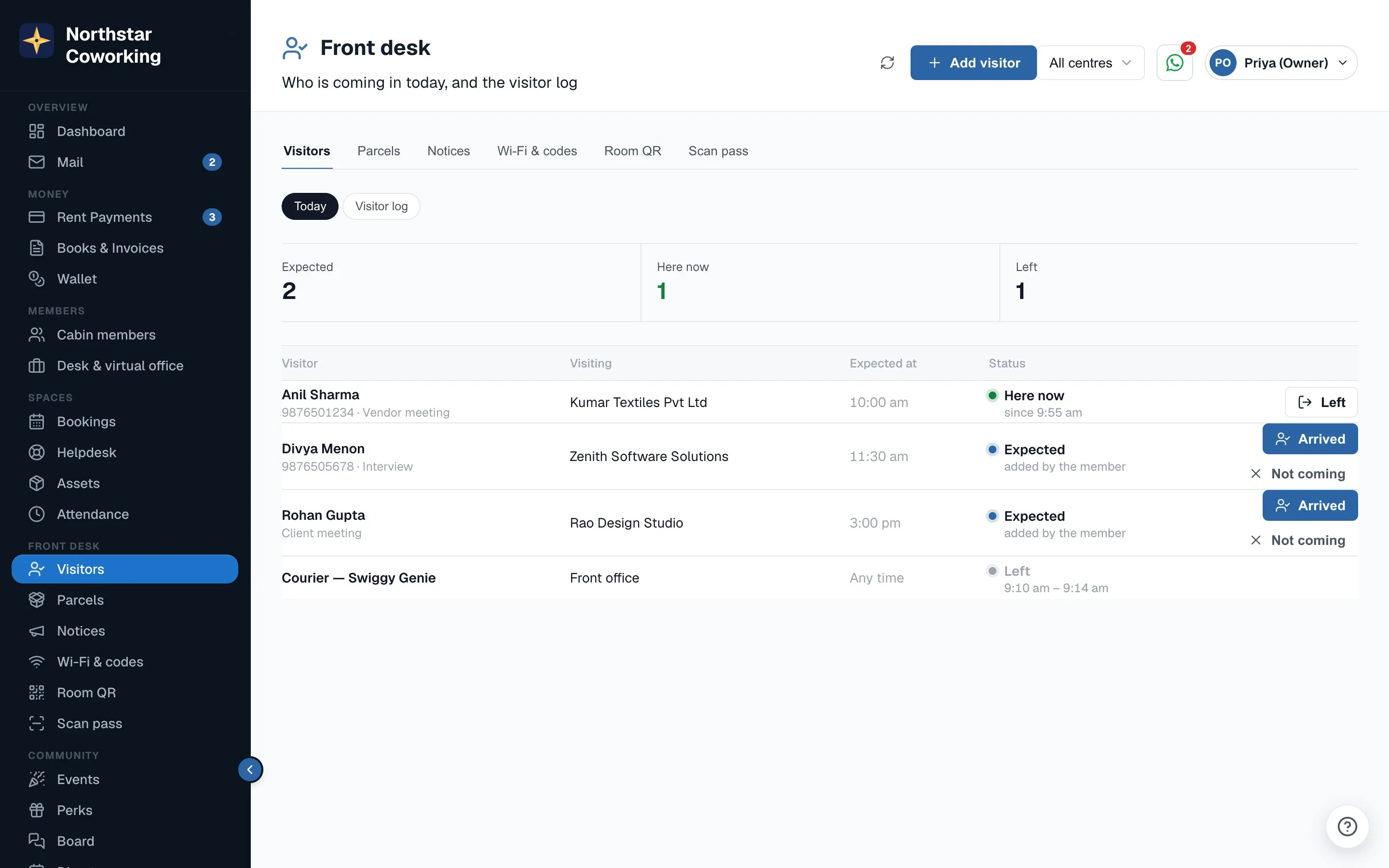
The Visitors tab is one list: who is coming in today, and the visitor log underneath. The top of the page shows three counts, Expected, Here now and Left, so a glance tells you how busy the day is.
Visitors get on to today's list in two ways:
- Members add their own guests from the member app, under Your guests. These rows show added by the member, so you know the member is expecting them and you do not need to call to check.
- Walk-ins you add yourself with Add visitor: name, who they are visiting, and a note if useful.
When the person turns up, press Arrived on their row. When they go, press Left. If they never show, press Not coming. That is all the reception has to do; the counts update as you go.
- A guest walks in and says they are here for a member in Cabin 4.
- Look for them on today's list. If the member added them, press Arrived.
- If they are not on the list, press Add visitor, fill in the name and the member, save, then press Arrived.
- When they leave, press Left.
The visitor log
Below today's list is the Visitor log: every visitor on earlier days with the date, who they visited, and when they arrived and left. Use the search box to find a name or a company, and pick a date range to narrow it. Export CSV downloads the list for a security register, an audit, or the building's management.
Parcels
The Parcels tab is for couriers and post that land at reception. Logging a parcel here does two things: the reception has a record of what is waiting and for whom, and the member sees it on the Home screen of their app, with a card that says a parcel is waiting for them.
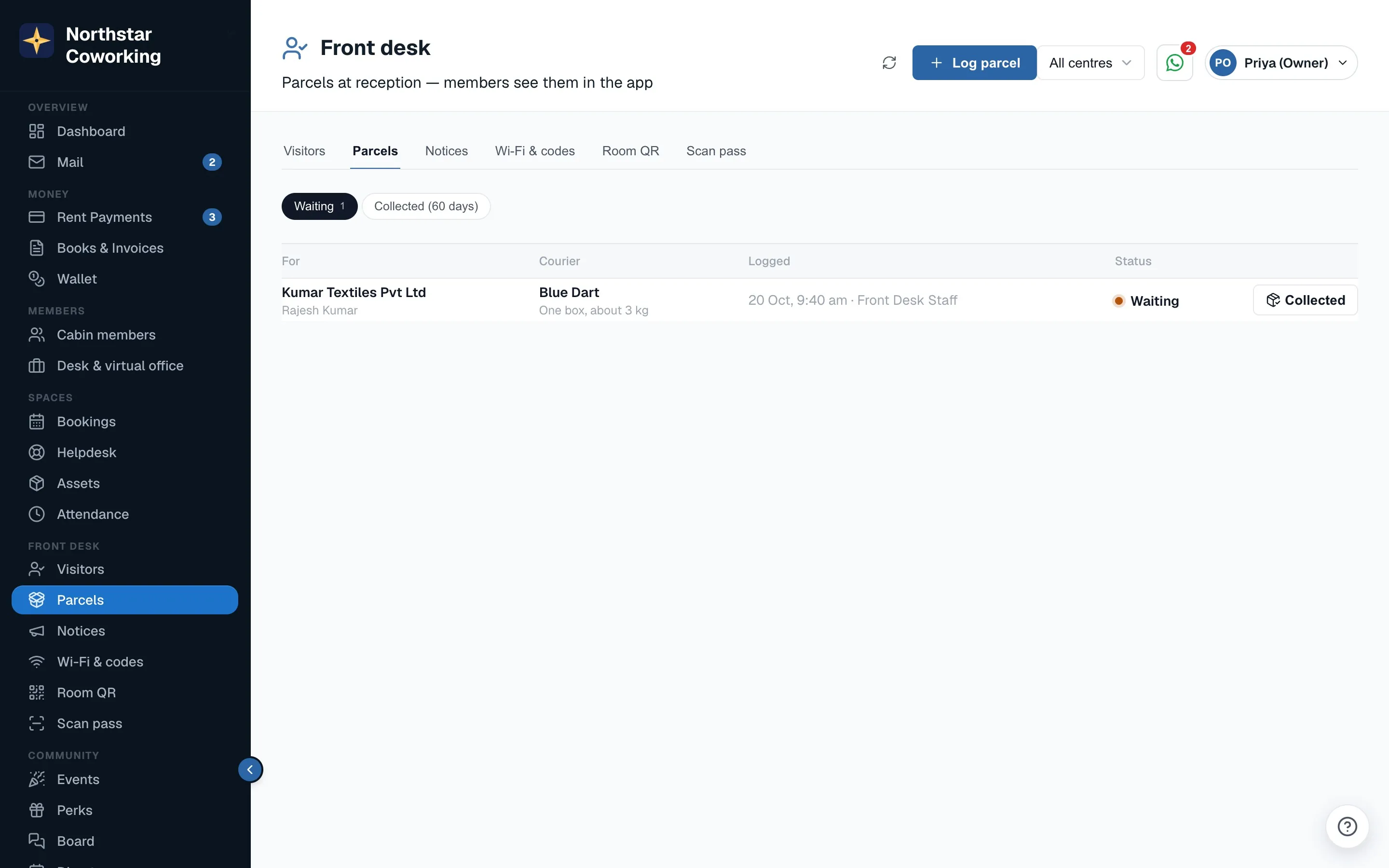
- Press Log parcel.
- Pick the member the parcel is for.
- Enter the courier (for example Delhivery, Blue Dart, India Post) and a short note such as 'Large box, kept behind the desk'.
- Add a photo of the label if you can. It helps when two parcels look alike.
- Save. The parcel now shows as waiting on this tab, and the member is told with a push (or an email if the push reaches no phone) and gets a 4-digit pickup code.
When the member comes for it, press Hand over on the parcel and type the pickup code they show you. It leaves the waiting list and the card disappears from their app. Members can also tap Collected themselves in the app. The full handover steps, the 3-day reminder and handing over without a code are in Parcel pickup codes.
Good to know
- Logging a parcel tells the member straight away, and a parcel still waiting after 3 days gets one reminder. A visitor's arrival is recorded, not announced.
- Staff can do everything on both tabs. There is no owner-only button here.
- Notices and the members' Wi-Fi card are on the next two tabs: see Notices and Wi-Fi for members.
- What members see on their side is in Guests, parcels, notices and Wi-Fi in the member app.
Related guides
Still stuck? WhatsApp us or write to info@coworkingos.in. Tell us the member or screen and we'll sort it with you.